OEM - Oma's Exp/Mob database
Fixes and Additions
5/28/01 7:00pm PST
OEM HTML is done! You can now generate a table of all kills in html format. Unfortunately I'm too lazy to make more page types, like sorted by "xx". It's just a table of all kills, sorted by mob name. Click here to see how it looks. FileLog.DLL IS REQUIRED I have the latest version, 1.01, on my DLL page.
OEM html is called via "htmlmob". 1 alias, and a few vars, all grouped as "OEMHTML". HTML is pretty generic and colors are from a 256 color palette so it should work with about 99% of the web browsing crowd. File output is to your main MM dir, as "OEM(TimeStamp).html". So you'd generate like: OEM99940930.html ..then you can rename it to whatever you want.
Right-Click here and Save As... to download the script (if you just left click this link, it'll look like crap, script has html tags in it...).
Added: Basic sorting. After using "oemsort" to sort a list, run "htmlsort" and it will make a sorted html page. Click here to see an example list sorted by most killed mobs.
5/27/01 7:35pm PST
Added "oemmobs" which will show an indexed list of ALL mobs killed (overall), ALL mobs killed (this session), or new unique mobs killed (this session).
Edited a few things, so if you have the script already, download the new one, open it in a text editor and delete all /variable and /listadd entries, then read in the new script.
5/27/01 5:10pm PST
Just fixed the "oemview" display so it pads the whitespace with "....".
If you already have OEM, download the new one, edit it with like wordpad, cut/paste /alias {oemview %0}.. into some file, and read that into MM.
5/27/01 4:40pm PST
You can now view sorted lists by lowest value-to-highest value. "oemlist -#".
If you already have OEM, download the new one, edit it in like wordpad, cut/paste /alias {oemlist %0}... and /alias {oem %0}... then just read those 2 aliases into MM.
5/27/01 3:30pm PST
Fixed how "unique" mobs are stored, so it now only counts "Somemob is DEAD!!" if you actually fought that mob (ignores it when you just happen to see that spam, when someone else has killed a mob). Also updates Session unique mobs correctly.
If you want to save your info (you've already run OEM), delete all the /listadd and variables from the NEW script, then /read it in.
The Ultimate Xp tracker/Kill database! It's pretty simple to use.. here's a walk-through of sorts. Please note: the Math.DLL is REQUIRED and a precision of 2 is recommended (although you might notice mine was at the default of 4 :p)
OEM will track all your kills (Mobs and players, although I don't distinguish between them (can find players though, via the oemsort command). It can keep a current session running (you can reset it at anytime). OEM has a number of displays, basic info (overall/session), databases on every mob/player you've killed, seperate but similar fields for when you're grouped or going solo, keyword/phrase search, sort by field, save, load, reset, etc...
1. Download the script, and install it. Everything is grouped as {OEM}, and all vars/aliases are pretty much original.
2. Reset it, it's not required but this will initialize the Session timer. "oem reset".
3. Go kill stuff.
Basic help screen is called via "oem", this alias also does the reset/save/load calls. "oem reset" "oem save" and "oem load". Save and Load write and read to "oem.txt", so if you mess it up, just re-download the script (or back it up) so it's in raw form.
Basic Commands
"oem" Shows a help screen, listing all commands."oem save" Saves the group as the text file "oem.txt". Use this often in order to keep your data current.
"oem load" Loads up "oem.txt". You might want to do this when you first start up MM, so you load up the latest stored data that you've previously saved.
"oem reset" only configures the current session settings, and will not affect the overall saved data. The only way to reset the overall data is to /killgroup OEM and reload the script.
DISPLAYS:
oeminfo
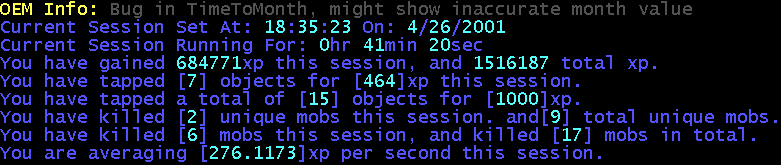
"oeminfo" shows the current session time (when it was set), and running time. Xp gained during the session, and xp gained since you first installed OEM. How many objects you tapped, and xp for them (session/overall). "Unique" mobs you've killed (session/overall) -- this means a unique mob name. You might have 500 kills, but if they were all "a janitor" you'd only have 1 Unique Mob kill. Total mobs killed (session/overall) -- this is the total kills you've been involved with, solo and/or grouped. And average xp per seconds (current session only).
oemfind
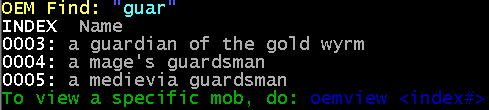
"oemfind [string to search for]" will search for a string in the list of mobs you've killed. You can use multiple words for the search. It will also show an Index number, which you can use to retrieve the data for that particular mob. You don't have to use the zeros preceeding the actual index number, although you can if you want.
oemview
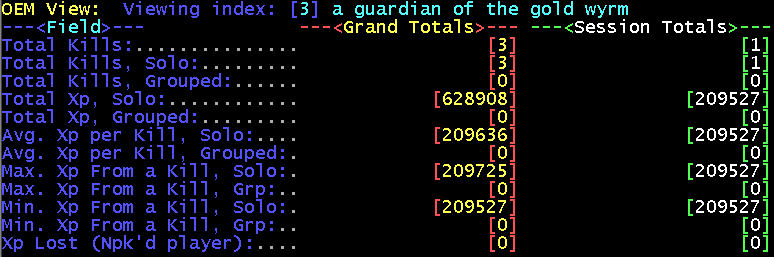
"oemview [index#]" will show info for a particular mob/player you have stored data for. It displays both overall data, and current session data. (ahh I see I forgot to finish the @PadLeft()s ....)
oemsort
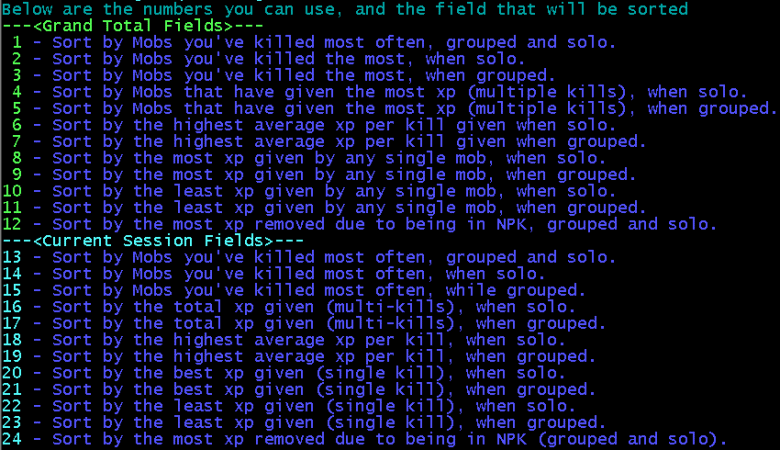
"oemsort" will display this listing, "oemsort [#]" will sort a list with the index you want to use. Find those high xp mobs, or look for player kills (xp removed sort).
oemlist
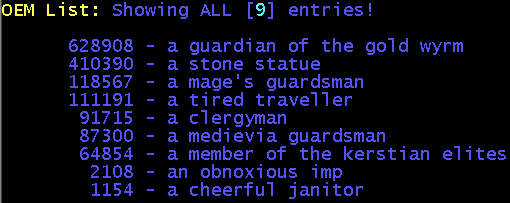
"oemlist" will display all the items in a sorted list (after you use "oemsort"). You can optionally just spew out a range of items, by supplying a value: "oemlist 8" would list out the top 8 items in the list. To view in reversed order (lowest to highest), us a negative value "oemlist -8" would show the lowest 8 entries.
oemmobs

"oemmobs" will display this spew, showing some totals..
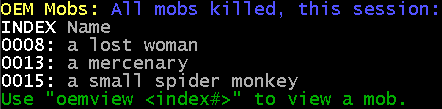
"oemmobs #" will display the indexed list. You can use "oemview #" to view the info about a particular mob.
Download OEM.txt - Text file, right-click the link and Save As...