How it works/How to run it:
-Install the script, you might disable the events (3 of them) until you're ready to use it.
-Get to where you want to watch and enable the events. Initially you might get a lot of spam, as the where/survey spew is all new.
-Get people to connect to you via chat so they can utilize the info.
simple!
Commands, explained:
Some commands are redundant, that is, what someone can do via chat the person running the script can also do via an alias. In the examples, aliases are show just how you'd type them in. Chat commands are show in quotes (but they don't use the quotes). Chat commands are sent DIRECTLY, not via /chatall. Use /chat.
Allow
First off, if someone connects to you via chat they don't have privs to use the info. You must authorize um. Say Joe wants access to the info, well you need to allow him.
Authorizing People
osAllow [name] - the alias to allow someone.
"os allow [name]" - same, via chat (managers only)
Viewing Who's Allowed
osAllow ? - see who's in the allow list
"os allow ?" - same, via chat.
Clearing the ENTIRE Allow list
osAllow clearIt - clear the entire list, no one is now authorized.
"os allow clearIt" - same, via chat (managers only)
You can remove a specific person from the Allow list via:
osDisallow [name] - remove this name from the allow list
"os Disallow [name]" - same, via chat (managers only)
Players with "Allow" privs can access the main display, and get instant-spew updates. People on your chat with no Allow access can do nothing, other than see the "info" display and use the msg (message) command.
Info display
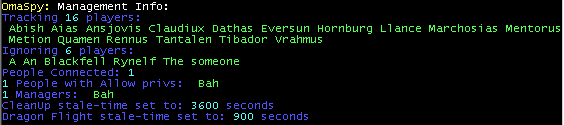
The info display is just a summary of various info. It can be handy for a quick reference about who's being ignored, or who's a manager, who's connected, etc. Also it's a way for people without Allow privs to see who's using OmaSpy, and then they can use the msg command to "chat" to them.
osInfo - showme the list
"os info" - same, via chat
Messaging Others
OmaSpy will send a message to someone on chat for you. This can be useful to get the attention of a manager (ask for Allow privs) or whatever.
There is no alias for this function.
"os msg [name] [message] - sends a message to someone.
Adding Managers
Managers are those trusted with some functions that you might not want everyone capable of doing.
osMgt [name] - add this chatname to the managers list
"os mgt [name] - same, via chat (managers only)
Ignoring Names
You will want to ignore names so that you don't track friends/clannies, etc. Also there are a few names that will be ignored by default (add more as needed), such as: "A", "An", "The", "someone", "Someone", etc.
osIg [name] - ignore this name, no data will be saved.
"os ig [name] - same, via chat (managers only)
Changing "stale" Times
Stale times are the time frame that info should be deleted at. This isn't the EVENT time, but how long should you store info on someone. There's no sense keeping info for hours, in particular for sightings of people just flying by on dragons. All times are in seconds.
osCleanTime [seconds] - Delete old data if it's xx seconds old. This is from the most recent SEEN field.
"os CleanTime [seconds]" - same, via chat (managers only)
osDragTime [seconds] - Delete old data for dragon flight info, if the most recent seen time is fresh, it won't delete this.
"os DragTime [seconds]" - same, via chat (managers only)
Note: Currently event FIRE times must be set manually. There are only 3 events. OmaSpyIt is the "main" event, that fires off "where". Defaulting to 10 seconds. The other 2 events just run the clean-up routines, and could be fired fairly often if you want, or just disabled if you want to save all the data.
Manually Firing "where"
You can use the alias, "osw" to manually do "where". Doing just "where" won't do a few routines that are needed, so use this alias if you want to do "where" (and survey) vs. via the event OmaSpyIt.
Main Display
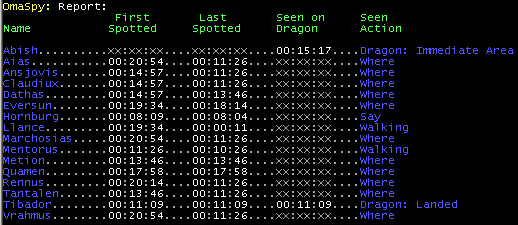
The main display shows the player's name, first time you've seen them (phyiscally on the ground, it won't give a first-time-seen for dragons in flight). Last time seen -- this is the most recent sighting, on the ground. Dragon flight seen -- if a player was seen via survey flying a dragon, this is the time they were seen. Seen Action -- this is the type of action done "saw" the player. Actions vary, such as "Where" (seen on where list), say, shout, arrived (seen doing something), Dragon: xx (seen via survey on a dragon).
In the example above..
You see Abish, he's never been on the ground as far as we know. He was last spotted flying a dragon (passing by no doubt) 15minutes and 17seconds ago
Hornburg was seen talking (in room you were in) 8min ago.
Mentorus walked through the room 10min ago.
Tibador landed a dragon (this action, landing, automatically updates First/Last seen too) 11min ago. He wasn't spotted after (no updates in 11 minutes) so no telling what he's doing, perhaps he's in cpk!!.
All the rest were seen via Where.
The Flags now have color, the "MIA" flag (missing in action) is red, and is the most likely threat. MIA means they were once on Where, but now are not. Note: If someone flew off on a dragon, they will shortly be "MIA", if the dragon time is the lowest time, and they're MIA, it simply means they flew off. You can disgard them as a threat. Dragon flight flags is in grey, the rest are in blue.
os1 - show the display (that's a ONE os+ONE)
"os" - via chat, views the main display.
Instant Update Spew
People connected, and with allow privs, can get some instant updates via chat when key events occur. Key events such as: When someone new is seen on "where", when someone leaves or returns to "where", and when someone lands/takes off, or flys-by (via survey) on a dragon.
There is no alias for this.
"os spew [on|off]" - via chat, turn spew on or off.
Making sense of it all
Key is the "Last Spotted field". If one is doing "where" often, and someone has been recently spotted, but a little old time-wise, then they are the most probable threat that has entered cpk. Players with very fresh "last spotted" fields are most likely still outside of cpk. Players with extremely old times are either hiding out in cpk, or gone. Shout would be a good indicator, assuming someone in cpk is stupid enough to shout. A fairly fresh shout time pretty much says "I'm in cpk" (because it's shout updated, not via where.. hence they're most likely in cpk).